Setup SDK & Environment
Technical Requirements
iOS 10 as a deployment target.
Required Information
Some information we must provided for the partner to use. Please ask for it if you don’t see it. They are:
- Facebook App Id
- Firebase google-services.json file
- Firebase GoogleService-Info.plist file
- SDK workflow and server api documentation
- Android keystore and password for it
- Apple provision profile (Adhoc and Production)
- Apple certificate and password for it
- GTVconfig for info.plist file.
Install
GTVFramework is available through CocoaPods. To install it, simply add the following line to your Podfile:
pod 'GTVFramework'
If you don’t want to use this framework through cocoaPods. You can set up manually:
- Drap and drop GTVFramework.framework to your project.
- In tab “General”, expand “Framework, Libraries, and Embedded content” you can see GTVFramework.framework, choose “Embed & sign”.
- Add frameworks require by GTVFramwork : AFFoundation.framework, CFNetwork.framework, libc++.tbd, libicucore.tbd, MapKit.framework, StoreKit.framework, SystemConfiguration.framework, WebKit.framework.
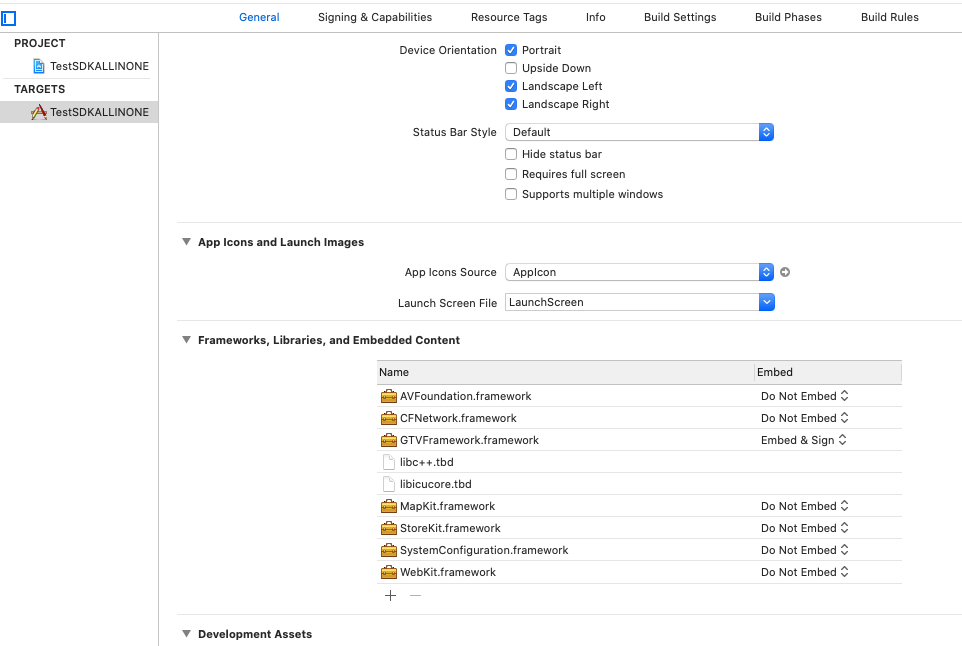
Note: immortal
If you setup Framework without cocoaPods, you need change all import header (#import <GTVLib/GTVLib.h>) to:
#import <GTVFramework/GTVManager.h>
Import
In AppDelegate.m, didFinishLaunchingWithOptions method add these following code to setup the SDK
//#import <GTVLib/GTVLib.h> // through cocoaPods
#import <GTVFramework/GTVManager.h> // without cocoaPods
- (BOOL)application:(UIApplication *)application didFinishLaunchingWithOptions:(NSDictionary *)launchOptions {
        // Override point for customization after application launch.
        [[GTVManager sharedManager] ImplementWith:application didFinishLaunchingWithOptions:launchOptions useProductServer:NO];// YES to switch to production, NO to switch to development
        return YES;
}
With Swift project, you need create a Bridging-Header.h file first. Then import GTVFramework in Bridging-Header.h
//#import <GTVLib/GTVLib.h> // through cocoaPods
#import <GTVFramework/GTVManager.h> // without cocoaPods
In AppDelegate.swift, implement GTVFramework
func application(_ application: UIApplication, didFinishLaunchingWithOptions launchOptions: [UIApplication.LaunchOptionsKey: Any]?) -> Bool {
        GTVManager.shared().implement(with: application, didFinishLaunchingWithOptions: launchOptions!, useProductServer: false)
        return true
}
Info.plist config
Now configure the .plist for your project: In Xcode right-click your .plist file and choose “Open As Source Code”.Copy & Paste the XML snippet into the body of your file (…). – Config for login via facebook
<key>FacebookAppID</key>
<string>{FACEBOOK_APP_ID}</string>
<key>FacebookDisplayName</key>
<string>{FACEBOOK_APP_NAME}</string>
<key>CFBundleURLTypes</key>
<array>
    <dict>
        <key>CFBundleTypeRole</key>
        <string>Editor</string>
        <key>CFBundleURLName</key>
        <string></string>
        <key>CFBundleURLSchemes</key>
        <array>
            <string>fb{Facebook_App_Id}</string>
        </array>
    </dict>
    <dict>
        <key>CFBundleTypeRole</key>
        <string>Editor</string>
        <key>CFBundleURLName</key>
        <string></string>
        <key>CFBundleURLSchemes</key>
        <array>
            <string>{Bundle_Identifier}</string>
        </array>
    </dict>
</array>
Note: {Facebook_App_Id} and {Bundle_Identifier}, we will send them privately for you
GoogleService-Info.plist and GTVService-Info.plist
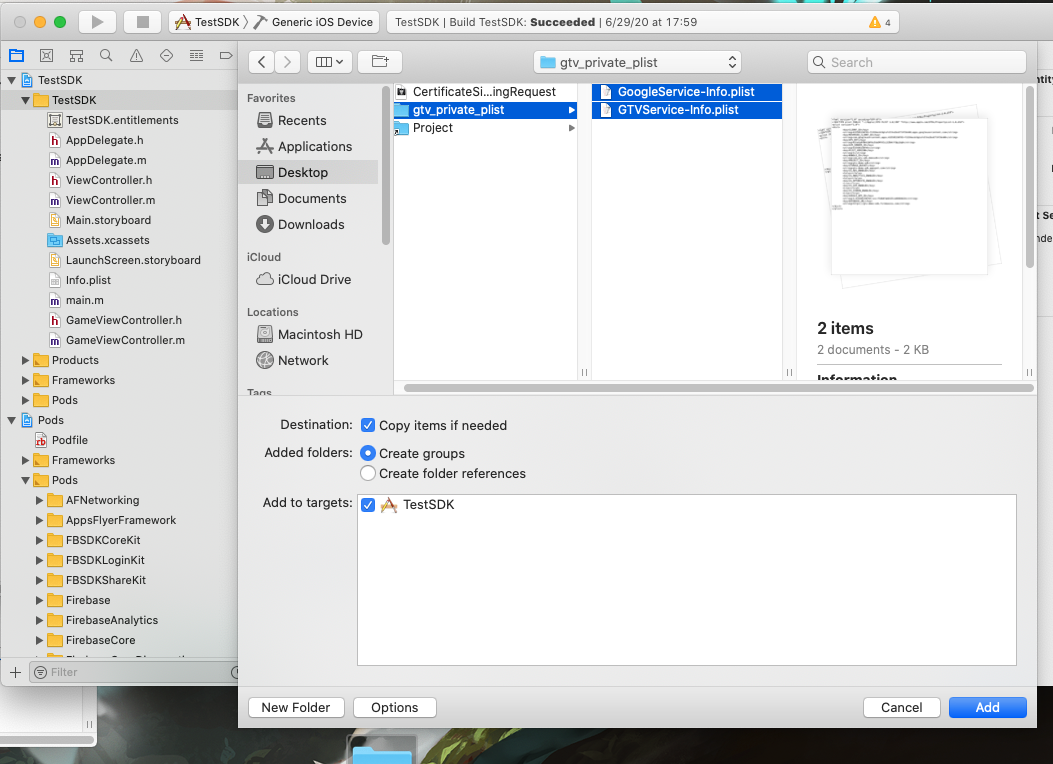
Config file GoogleService-Info.plist and GTVService-Info.plist
. Copy files GoogleService-Info.plist and GTVService-Info.plist into the root of your Xcode project. If prompted, select to add the config file to all targets.
- Config App Transport Security
GTVFramework use google login. You need to set URL schema for google login. Open file GoogleService-Info.plist and copy short text , It’s like that :
com.googleusercontent.apps.542996191572-8h0go6lss5pivtbqj44g371s51gnhonm
and add to URL schema.
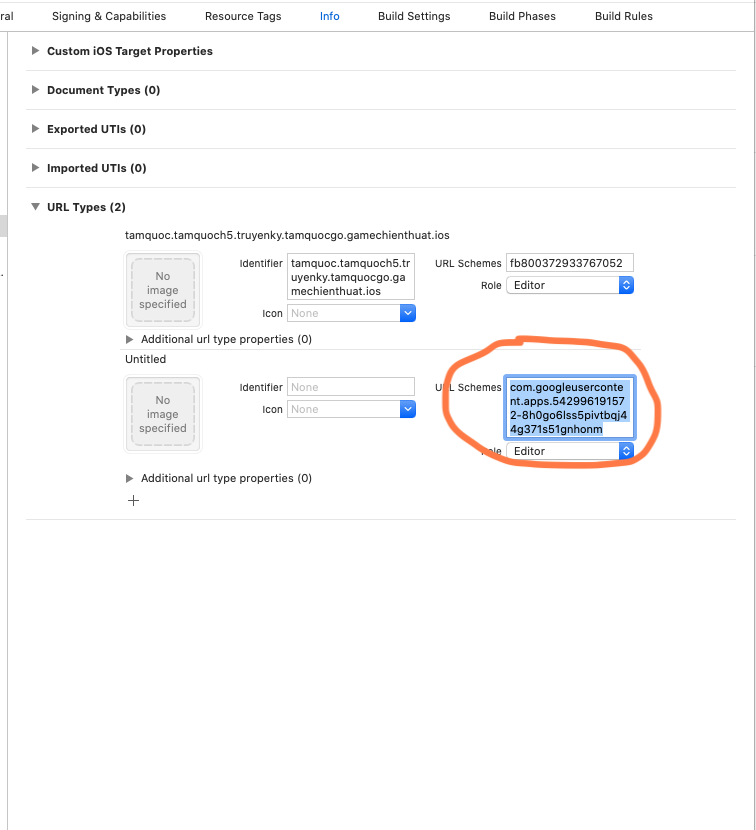
Note: This files (GoogleService-Info.plist and GTVService-Info.plist) we will send it privately for you
- Config App Transport Security
<key>NSAppTransportSecurity</key>
<dict>
        <key>NSAllowsArbitraryLoads</key>
        <true/>
</dict>
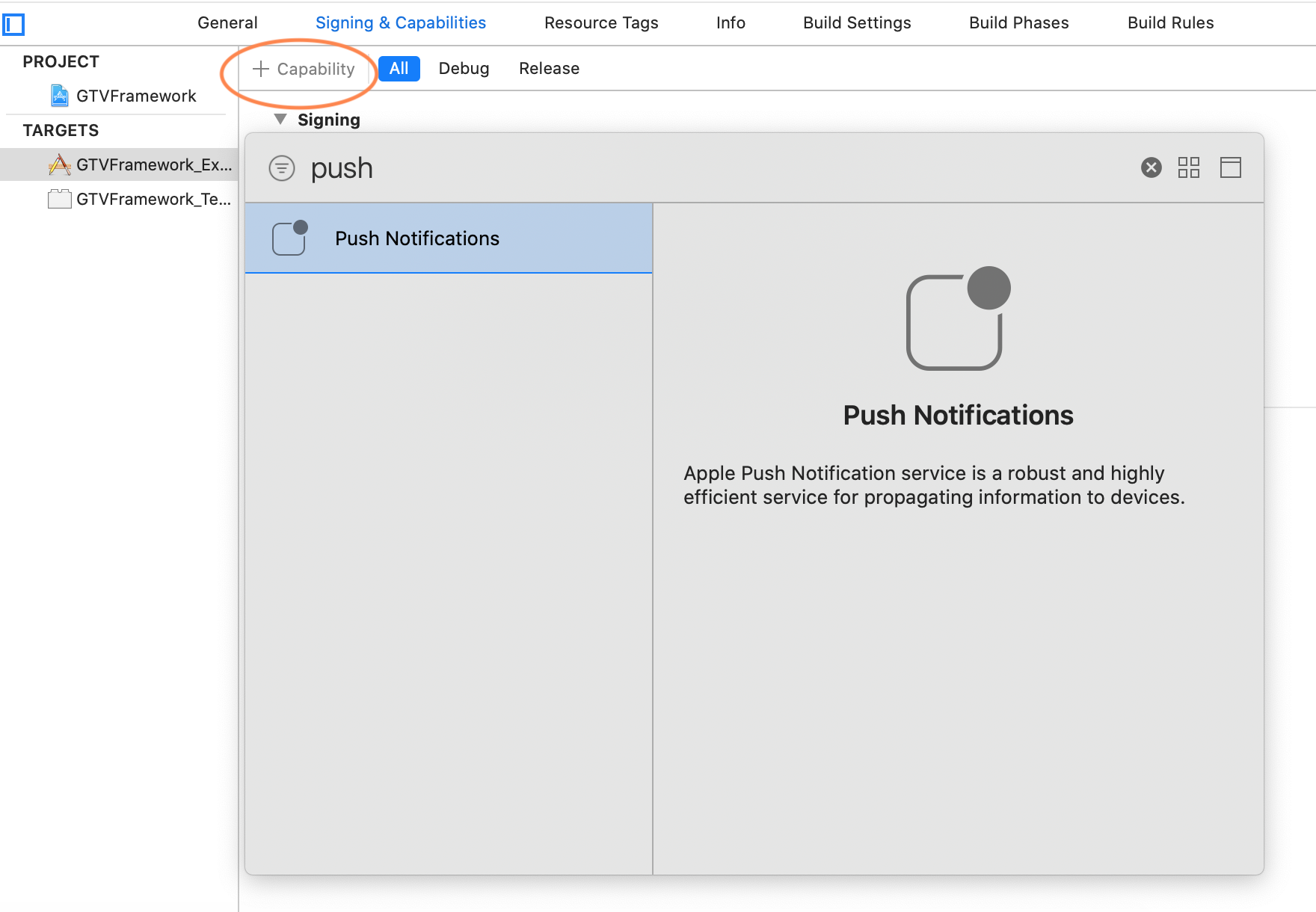
Enable Push Notification
Goto Capabilities -> Push Notification -> Turn On
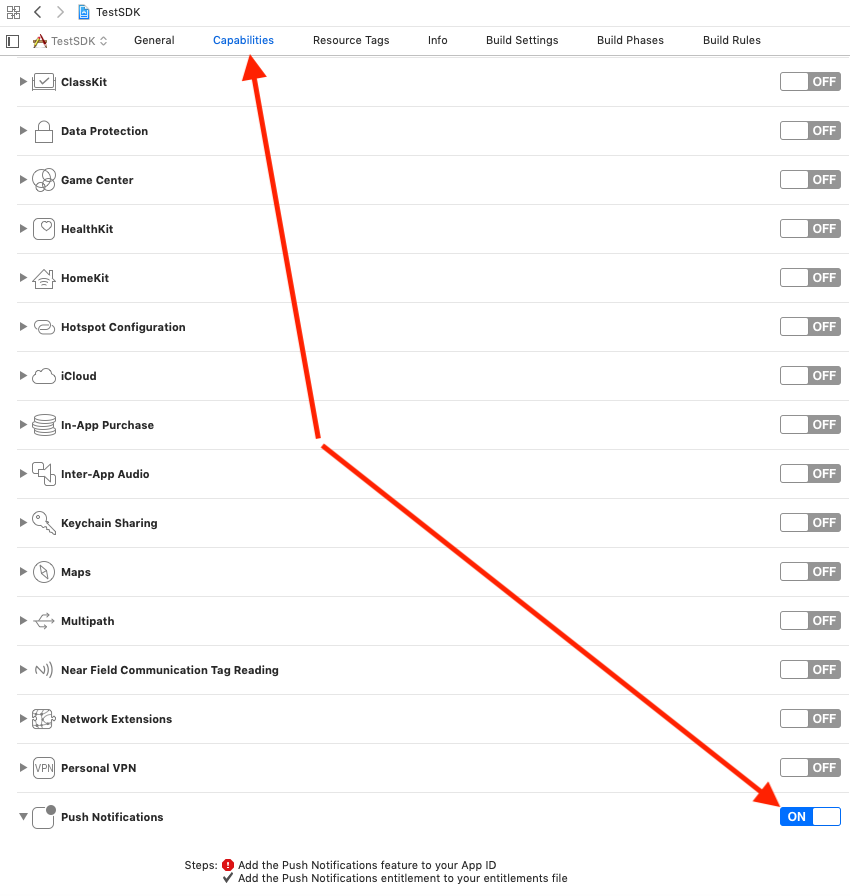
With new Xcode version(> Version 11.4)
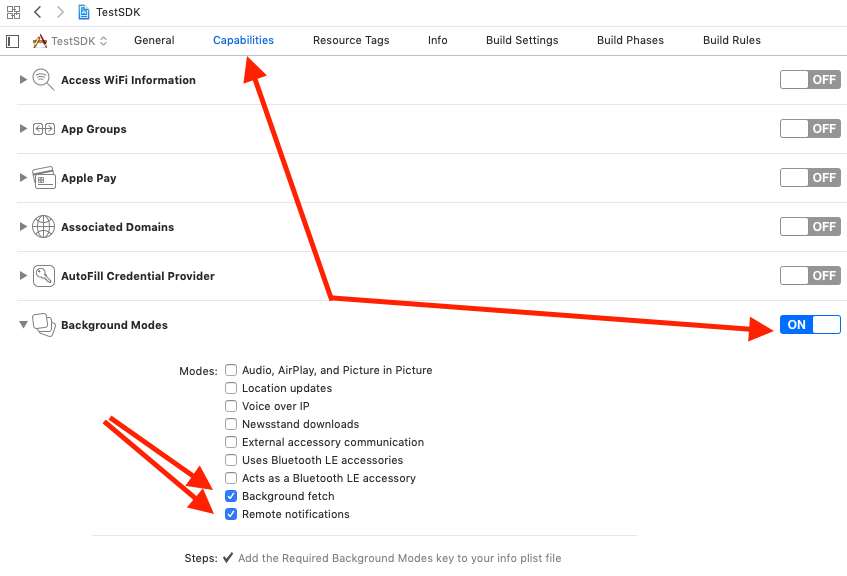
Enable Background Mode
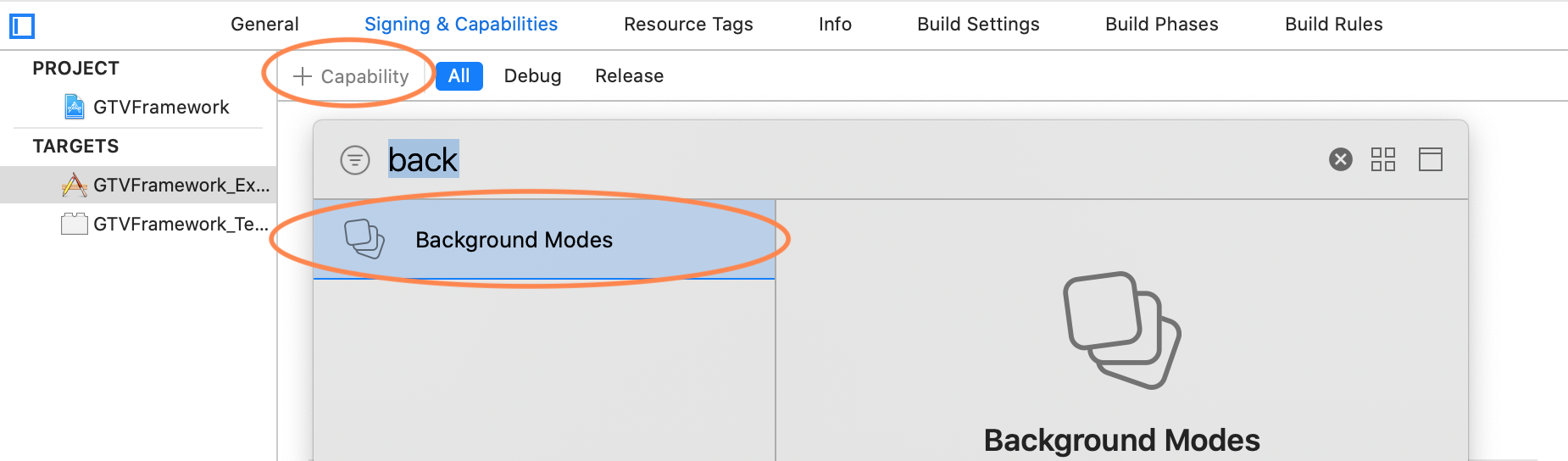
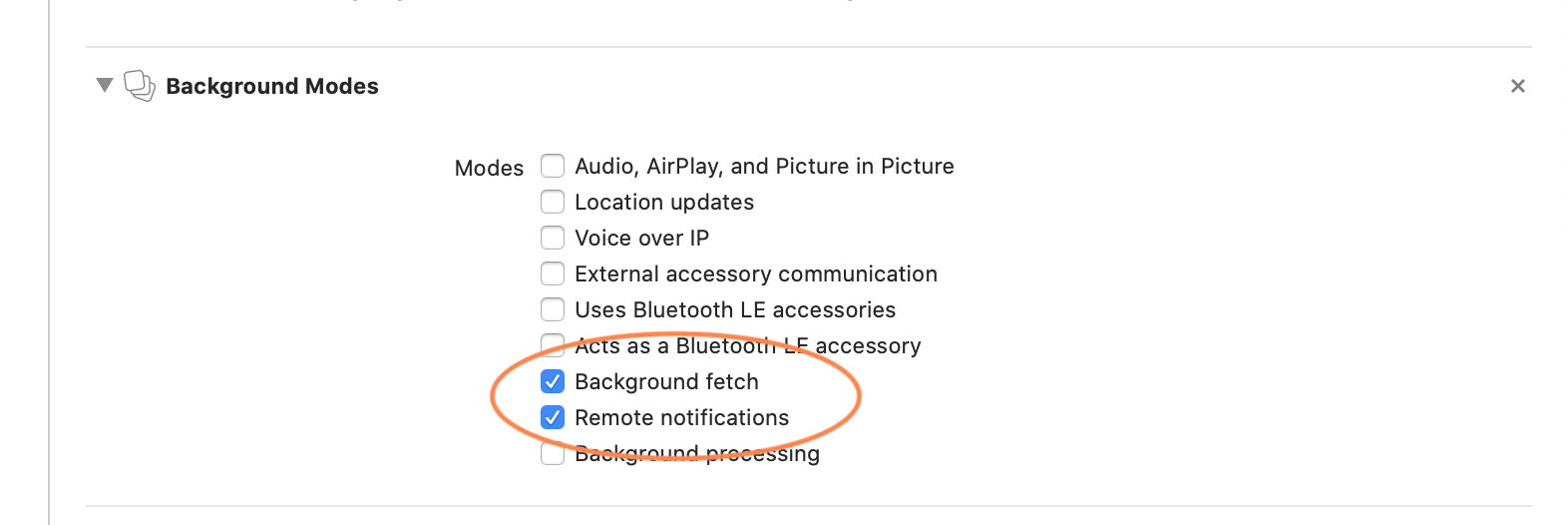
Goto Capabilities -> Background Modes -> Turn On Check to Background fetch, Remote notifications
With new Xcode version(> Version 11.4)
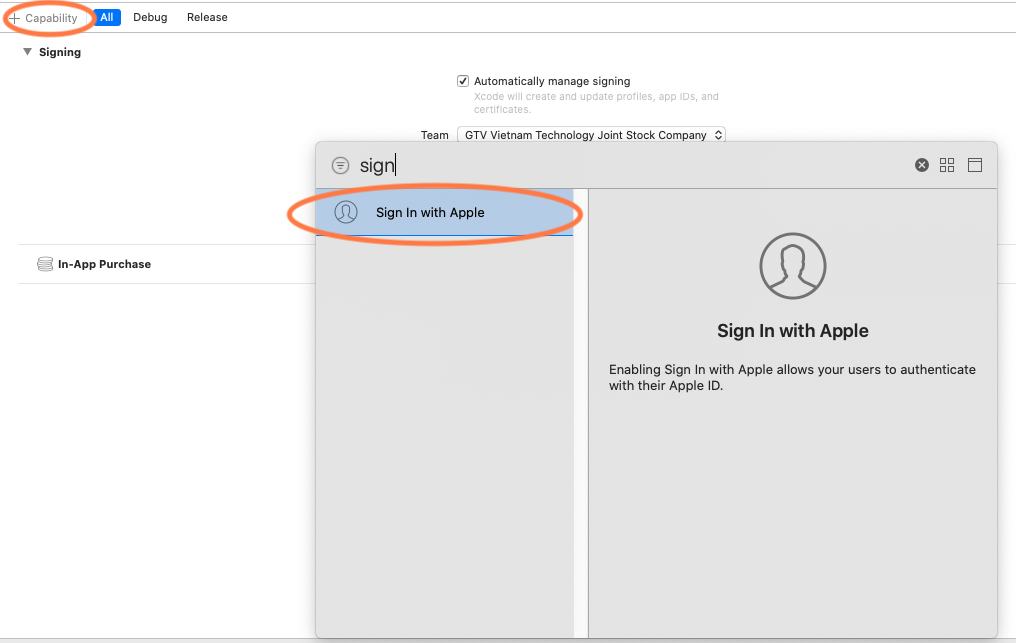
Enable Sign In with Apple
Goto Capabilities -> Sign In with Apple -> Turn On
With new Xcode version(> Version 11.4)
Setup handle notification and login facebook
In AppDelegate.m
- (BOOL)application:(UIApplication *)app openURL:(NSURL *)url options:(NSDictionary<UIApplicationOpenURLOptionsKey,id> *)options {
        bool shouldOpen = [[GTVManager sharedManager] gtvApplication:app openURL:url options:options];
        return shouldOpen;
}

- (void)application:(UIApplication *)application didRegisterForRemoteNotificationsWithDeviceToken:(NSData *)deviceToken {

        // Handle notify.
        [[GTVManager sharedManager] handleNotificationsWithDeviceToken:deviceToken];
}
- (void)scene:(UIScene *)scene openURLContexts:(NSSet<UIOpenURLContext *> *)URLContexts API_AVAILABLE(ios(13.0)){
        NSURL *url = [[URLContexts allObjects] firstObject].URL;
        bool shouldOpen = [[GTVManager sharedManager] gtvApplication:[UIApplication sharedApplication] openURL:url options:nil];
}
func application(_ app: UIApplication, open url: URL, options: [UIApplication.OpenURLOptionsKey : Any] = [:]) -> Bool {
        let shouldOpen = GTVManager.shared().gtvApplication(app, open: url, options: options)
        return shouldOpen;
}
func scene(_ scene: UIScene, openURLContexts URLContexts: Set<UIOpenURLContext>) {
    guard let url = URLContexts.first?.url else {
        return
    }

    GTVManager.shared().gtvApplication(UIApplication.shared, open: url, options: [:])
}